When a microwave plate stops turning, it is almost always one of four things. The tray has slipped off its hub, the roller ring underneath is dirty or jammed, the plastic coupler that drives the tray has worn out, or the turntable motor has failed.
On some models it is just a setting that has been switched off, and occasionally the control board that powers the motor is the culprit. The first checks cost nothing and take about two minutes.
A coupler or motor repair is another matter, and on a cheap countertop microwave it often costs more than a new one.
The short version
- Fastest fix: unplug it, lift out the tray and ring, clean the floor, check the coupler, and put everything back flat.
- Does it still heat? Usually yes, but the heat may not distribute evenly, leaving hot and cold spots in the food.
- Is it safe to keep using? Sources disagree. Wolf advises against it, while others call short use acceptable. The safety section explains how to weigh that.
- Worth fixing? It depends on the type of microwave. See the repair-or-replace section.
First, make sure it’s meant to spin
A stationary plate is not always a fault.
- Rotation may be switched off. On Whirlpool-family models, rotation can be turned off in manual modes, but not in preset or sensor programs. That gives you a quick test. If the plate turns on a preset such as popcorn or reheat but not on a manual time cook, the motor and coupler are fine and the setting is off. GE’s parts guidance also says to check the control settings before suspecting the motor.
- The direction can change. Whirlpool says a turntable that alternates direction is normal and depends on how the motor starts each cycle.
- Some microwaves don’t spin. Some types have still plates, or modes that hold the plate in place.
Check your manual. Other brands handle this differently. Search your model number plus “owner’s manual” to see whether yours has a turntable on/off key.
What turns the plate
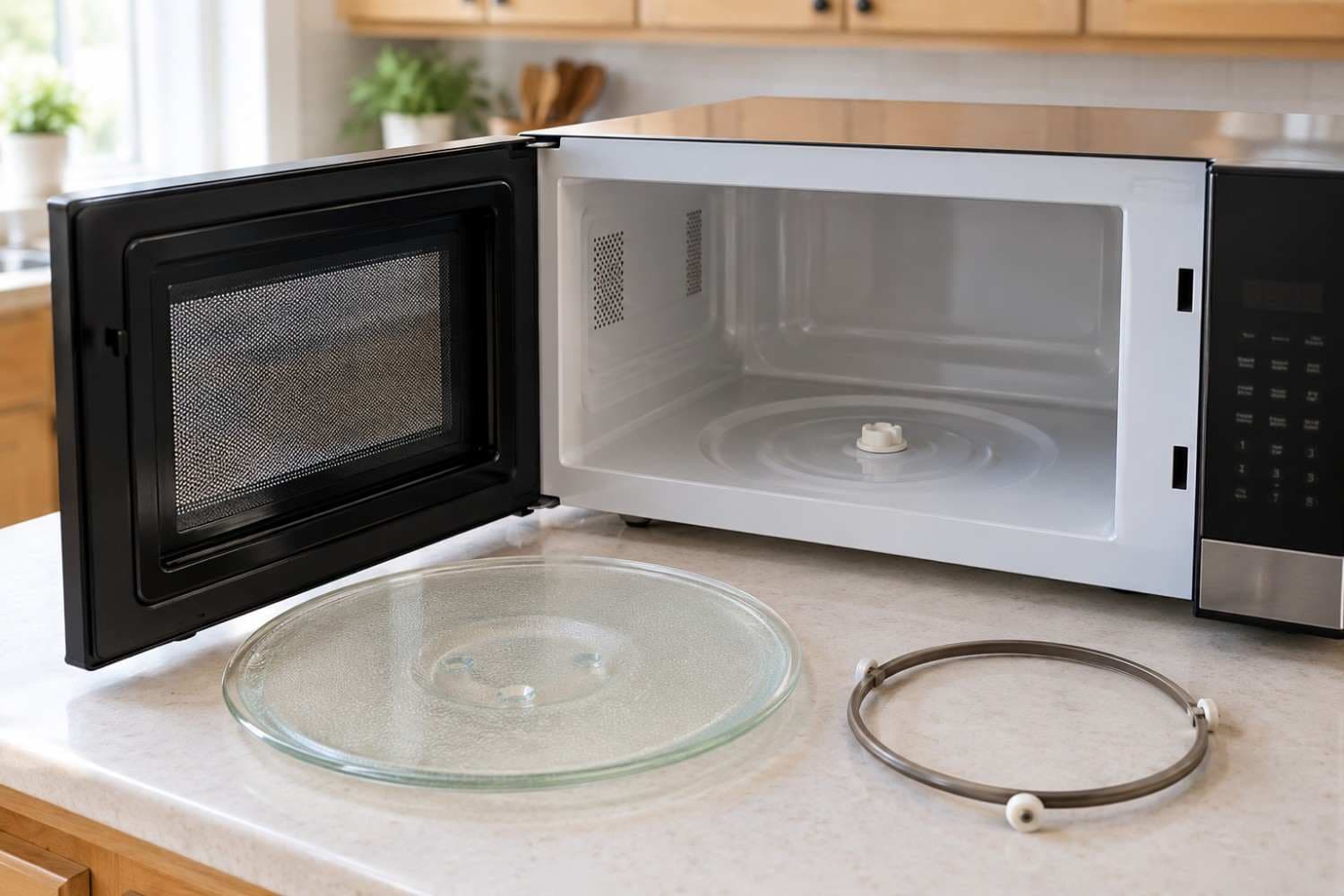
- Tray (glass plate): your food sits on it. Its underside locks onto the coupler.
- Roller ring: a ring of small wheels that carries the tray’s weight on the oven floor.
- Coupler: the small plastic hub at the center of the floor that connects the motor shaft to the tray.
- Turntable motor: a small motor under the oven floor that does the turning.
The two-minute checks
None of these involve opening the casing.
- Reset it. Unplug the microwave for 30 seconds. On a built-in, switch its breaker off for about 10 seconds, a step Wolf includes in its own troubleshooting. Leave it unplugged for the next steps.
- Check what’s on the tray. A dish wider than the tray, or one that touches the side wall, can stop it. Oversized dishes are one reason manufacturers let you switch rotation off.
- Lift out the tray and the ring. Look underneath for spilled food, packaging, a cracked ring or a missing wheel.
- Clean everything. Wash the tray and ring in warm soapy water, clean the oven floor and roller track, and dry all parts.
- Inspect the coupler. Look for cracks, rounded or stripped prongs, melted plastic, or a missing piece.
- Reassemble and test. Set the ring flat with the wheels down, then place the tray right side up so it seats on the hub. Spin it by hand. It should move freely and quietly. Then plug the microwave in and run it for 30 seconds with a microwave-safe cup of water inside. Never run it empty, because that can damage the magnetron.
To stop it recurring, reseat the tray after every cleaning and keep the oven floor clear of debris.
Coupler or motor? How to tell without opening the casing
If the tray is seated, the ring is clean and the plate spins freely by hand, look at the coupler. A cracked, stripped, melted or missing coupler explains a plate that won’t move.
If the coupler is intact and you hear humming or faint clicking from underneath, the motor is the likelier cause. If it is silent, either the motor or the board that powers it has failed. Only a technician can tell which by testing the supply to the motor. Don’t try to watch the hub by running the microwave with the tray out.
What you see or hear, and what it usually means
- Turns on presets but not on manual cooking: rotation is probably switched off, on models with that feature. Check the turntable key or settings menu.
- Thumping, rumbling, wobbling, or the plate catches: the tray isn’t seated, there is debris on the ring track, or the dish is too big. Repeat checks 2–6.
- Stopped right after cleaning: the ring or tray went back wrongly. Reseat both.
- Turns on some cycles and not others: often a worn coupler or a weak motor, once seating and debris are ruled out. Inspect the coupler, and call a technician if it’s intact.
- Hum or click underneath, plate won’t move: a broken coupler or a failing motor. Inspect the coupler, and call a technician if it’s intact.
- Silent, nothing moves, coupler fine: the motor, or the power supply to it. Call a technician.
- Plate turns while the microwave is idle: a fault, which Wolf lists separately. Call a technician.
- Direction changes between cycles: normal. Nothing to fix.
Is it safe to keep using while you wait?
It still heats, but unevenly. Without rotation, the heat may not spread evenly through the food.
The sources disagree on whether to keep using it. Wolf does not recommend using the oven if the turntable stops, citing possible further damage but not explaining the mechanism. A jammed tray loading the motor is a plausible reason, though that is our inference. A service company’s help page calls short use generally safe, with hot and cold spots, and still recommends fixing it.
The food-safety risk is the same one that exists with a working turntable. The USDA says to stir, rotate or turn food midway through even if the oven has a turntable, because cold spots can let bacteria survive. A stopped plate makes that step matter more.
If you have to use it before it’s fixed
- Stir or turn the food halfway through and rotate the dish by hand, as the USDA advises.
- Check the temperature in several spots with a food thermometer, then add time and let the food stand if needed.
- Be especially careful with baby food and formula, because microwaves heat unevenly. Stir or shake thoroughly and test the temperature before feeding.
- Keep runs short and stay nearby.
Stop using it if (our conservative guidance)
- you smell burning or hot plastic
- the coupler or tray looks melted or deformed
- you hear grinding or buzzing from under the plate
- you see sparks inside the microwave
- the door doesn’t close properly
What you can fix yourself, and what it costs
- Tray: a homeowner job. Replace it if the underside is chipped or cracked. Prices are model-specific, so look the part up by model number.
- Roller ring: a homeowner job. Replace it if it is warped or a wheel is missing. Prices are model-specific as well.
- Coupler: often a homeowner job, and the part must match your model number. A technician repair runs about $40–$80, based on our microwave repair page.
- Turntable motor: leave this to a technician. A repair runs about $80–$150, based on the same page.
- Control board: a technician job, because it takes testing the supply to the motor. We quote after diagnosis.
The motor is where advice splits. Some parts retailers present motor replacement as a DIY job, while Whirlpool calls it a task for a professional. We side with Whirlpool. The motor sits under the oven floor, and getting to it means opening the casing, which puts you near the high-voltage capacitor. That capacitor holds a charge even after the microwave is unplugged.
Repair or replace?
The type of microwave and the price of a new one decide this.
- Countertop: a new one costs roughly $100–$300. If a new one is under about $200, replacing is usually the better call. Over about $250, or if it is a model you want to keep, repair can make sense.
- Over-the-range: Consumer Reports’ tests span $200–$2,000, plus possible installation, and you may need a matching unit or cabinet changes. Repair is easier to justify because replacing involves mounting and fit, but age still matters.
- Built-in: these are integrated into the cabinetry, so repair is usually worth it.
Where the guidance differs. We generally treat an over-the-range microwave under about 8 years old as worth repairing. Consumer Reports’ survey analysis draws the line earlier, at roughly 5–6 years, and says the call depends on what the unit originally cost.
Its guidance is built on depreciation and replacement cost, not on the price of the specific repair, which is why your quote still decides it. A common rule is to replace when a repair costs more than half the price of a new unit, the same rule we use for refrigerators.
Two hypothetical examples
- Countertop, $120 new: a motor repair at $80–$150 is 67% to 125% of the price of a new one, and even the $89 diagnostic is about 74% of it if you decline the repair. Do the free checks, try a replacement coupler if yours is broken, and replace the microwave if the plate still won’t turn.
- Over-the-range, $450 to replace before installation: the same $80–$150 repair is 18% to 33% of the price, well under half. If the unit isn’t too old, repair makes sense.
If you decide to replace it
Our guide to appliance brands that hold up in coastal and inland California homes can help you choose a replacement. When the old one comes out, there are local recycling options for old appliances in Fallbrook.
When to call a technician
Call if you have an over-the-range or built-in unit, a pricier countertop model, a coupler that is intact but a plate that still won’t turn, or a plate that spins while the microwave is idle. Over-the-range units are common in newer Fallbrook homes, and our microwave repair service covers them.
Microwave diagnostics start with a safe discharge of the high-voltage components before any work. We diagnose in 20 to 40 minutes and give you a flat-rate quote before repairing anything.
The diagnostic is $89, waived if you go ahead with the repair, and repairs carry a 90-day parts and labor warranty. Same-day service may be available for calls before 11 am, depending on where you are.
To book a diagnostic visit or ask a quick question, contact us and tell us your microwave’s brand, type and what the plate is doing.